

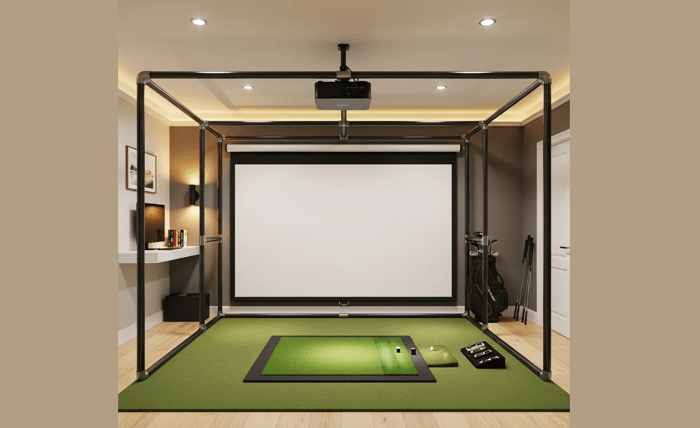
Building a home golf simulator is one of those projects where the first one teaches you everything you wish you’d known before starting. Talk to anyone who’s done it and they’ll tell you the same thing: they got most of it right, and one or two things completely wrong, and those one or two things ended up costing real money.
Here are the seven mistakes that come up again and again, plus how to avoid each one before you spend a dollar.
Mistake 1: Not Measuring Your Ceiling Height Before Buying Anything
This is the one that derails more setups than any other.
A full golf swing requires more vertical clearance than most people expect. You need at least 9 feet of ceiling height for a comfortable setup. Ten feet is better. Anything under 8.5 feet and you’re going to clip the ceiling on irons and drivers, which is both frustrating and damaging to whatever is above you.
The mistake isn’t just buying a space that’s too low. It’s buying equipment sized for a taller room before confirming the actual ceiling height. People order a 10-foot screen, mount a projector on the ceiling, and then discover there’s only 7 feet of clearance after mounting hardware is factored in.
Fix it: Measure floor to ceiling at the exact point where you’ll be swinging. Subtract 6 to 12 inches for mounting hardware and screen borders. What’s left is your usable height. Buy your screen based on that number.
Mistake 2: Buying a Screen That’s Too Small for Your Room
This one is related to ceiling height but it’s a separate error. Even in rooms with plenty of vertical space, people buy screens that are too narrow.
A 7-foot-wide screen might seem large when you’re looking at it in a product listing. In practice, a miss-hit or a shot that starts slightly off-center can catch the edge. When a golf ball hits the edge of a taut screen at full speed, it either tears the screen, bounces back dangerously, or both.
The minimum recommended width for a home setup is 10 feet. Twelve feet is better if your room allows it.
Fix it: Go bigger than you think you need. The screen is the part of your setup that catches the ball. There’s no such thing as too much margin on the sides.
Mistake 3: Skipping an Enclosure and Regretting It Later
An enclosure is the frame and side netting system that surrounds your screen. A lot of first-time builders skip it to save money. They figure the screen is enough and the side panels can come later.
They’re usually right for about three sessions. Then a ball sneaks around the edge of the screen, rolls under a shelf, bounces off a wall, and they’re retrofitting an enclosure anyway but now they’re working around equipment they already installed.
Enclosures also improve the projection experience significantly by blocking ambient light from the sides. Without one, you’ll find yourself trying to black out the room more aggressively, which creates its own hassle.
Fix it: If you’re committing to a real setup, include the enclosure in your initial planning. Check sizing guides like the ones at GolfingSim to find enclosure options that pair with your chosen screen size. It’s much easier to build this in from the start than to retrofit it six months later.
Mistake 4: Using a Thin or Cheap Hitting Mat
The hitting mat is the most underrated part of the whole setup. Everyone focuses on the screen and the launch monitor, and then they lay down a $30 mat from a sporting goods store.
Thin mats with no proper base transfer shock directly to your wrists and elbows. Hit off one for a few weeks and you’ll feel it. The turf quality also affects how the ball sits and how your club engages the surface, which matters a lot if you’re using your simulator to actually improve your ball striking.
Good hitting mats have multiple layers: a firm base, a shock-absorbing middle layer, and a realistic turf surface on top. The difference in feel is significant and it protects your joints over time.
Fix it: Budget at least $150 to $300 for a decent mat. The Fiberbuilt and Country Club Elite mats are consistently well-reviewed. Think of it as protective equipment, not just floor covering.
Mistake 5: Getting the Projector Placement Wrong
There are three ways projector placement goes wrong: too short a throw distance, projecting at the wrong angle, and mounting it somewhere it gets hit.
Too short a throw distance means the projector doesn’t have enough room to fill your screen, so you end up with a smaller image or you have to use digital zoom, which kills image quality. Every projector has a throw ratio spec. Match that spec to your actual room dimensions before buying.
Projecting at an angle creates keystoning, where the image warps from a rectangle into a trapezoid. Most projectors have keystone correction, but using it digitally degrades image quality. You want the projector centered and level with the screen whenever possible.
And yes, people mount projectors in places where a wayward club or a low ceiling fan can reach them. A cracked projector lens is a $300 to $800 mistake.
Fix it: Use the projector’s throw ratio to calculate exactly where it needs to be placed for your screen size. Then find a mounting spot that’s out of range of your swing path, secured to a stud, and protected from anything moving around at head height.
Mistake 6: Not Running a Dedicated Electrical Circuit
This one feels overly cautious until it happens to you.
A golf simulator setup draws significant power. You’ve got a projector, a launch monitor, a gaming PC or console, possibly a fan, and maybe some LED lighting. When everything runs on the same circuit as the rest of your garage or basement, tripped breakers become a regular occurrence.
A breaker tripping mid-round is annoying. A breaker tripping mid-calibration with a launch monitor can corrupt settings or data. And repeatedly loading an electrical circuit to near capacity shortens the life of everything on it.
Fix it: Have an electrician run a dedicated 20-amp circuit to your simulator space. It typically costs $150 to $300 depending on your panel location and how much drywall work is involved. It’s worth every penny.
Mistake 7: Ignoring Your Network Setup
This surprises people, but a stable network connection is critical for most modern simulator setups.
Golf simulator software connects to online course libraries, updates automatically, tracks stats to cloud accounts, and in multiplayer setups, streams data in real time. A WiFi connection that drops or fluctuates doesn’t just slow things down, it can freeze your session mid-round or cause course downloads to fail midway through.
The issue is that garages and basements are often the worst spots in a house for WiFi signal. Concrete walls, distance from the router, and interference from other devices create dead zones right where your simulator lives.
Fix it: Run a wired ethernet connection to your simulator space if at all possible. A single ethernet cable from your router or a switch to your PC and projector eliminates the problem entirely. If wiring isn’t practical, a WiFi mesh node placed in the simulator room is the next best option. Either way, don’t assume your existing WiFi will hold up before you test it.
The Bottom Line
Most of these mistakes share the same root cause: planning around the exciting parts (screen, launch monitor, software) and glossing over the structural details (space, power, network, mat). The exciting parts are easy to research. The structural details save you money and headaches.
Get the foundation right and the rest of the build is genuinely fun. Get it wrong and you’ll be undoing work you already paid for.
Contributed by the team at GolfingSim, a resource for golfers building home simulator setups from scratch.